Wednesday, 1 March 2017

BCA 2 nd sem /011/Solved Assignment/Problem Solving And Programming/2016-2017 New

Q.1.Mention the type of applications which can be developed using C language. Also, list the latest C compilers that are available in the market by giving the complete details like the name of the compiler, version, vendor‟s name, DOS based /WINDOWS based / Others, year of release, etc..


A.1. Features of ‘C’ language:-

C is a general purpose, structured programming language. C programming is widely used in computer Technology.
 ·         Low Level Features:
C programming provides Low level features that are generally provided by the Lower level languages. C is closely related to Lower level Language such as “Assembly Language”.
It is easier to write assembly codes in C programming.
·         Portability:
C Programs are portable i.e. they can run on any Compiler with little or No Modification.
Compiler and Preprocessor make it possible for C Programs to run it on Different Platforms.
·         Powerful:
Provides wide verity of “Data Types”
Provides wide verity of “Functions”
Provides useful Control and Loop Control Statements
·         Bit Manipulation
C Programs can be manipulated using bits. We can perform different operations at bit level.
It provides wide verity of bit manipulation Operators. We have bitwise operators to manage Data at bit level.
·         High Level Features:
It is more User friendly as compare to Previous Languages. Previous languages such as BCPL, Pascal and other programming languages never provide such great features to manage data.
Previous languages have their Pros and Cons but C Programming collected all useful features of previous languages thus C become more effective Language.
·         Modular Programming:
Modular programming is a software design technique that increases the extent to which software is composed of separate parts, called Modules.
C Program consist of different modules that are integrated together to form complete program.
·         Efficient Use of Pointers:
Pointers have direct access to memory.
 C supports efficient use of pointer.
·         More Efficient:
C Programming language is more efficient to Other languages.

Application Developed in C Programming are:-
 1.      C language can be used for creating computer applications
2.      Can be used in writing Embedded software
3.      Firmware for various electronics, industrial and communication products which use Micro-Controllers
4.      It is also used in developing verification software, test code, simulators etc.
5.      For Creating Compilers of different languages.
6.      C is used to implement different Operating System Operations.
7.      Unix kernel is completely developed in C Language.
                                                                                                            
Three ‘C’ compilers:-
1.      Turbo C++
2.      Borland C++
3.      Visual C++


      Q.2.Draw a flow chart and write a corresponding interactive program which prompts the user with the following options on the opening menu: 1) Subtract two integers 2) Compare two integers to find the smallest 3) Test an integer for odd or even 4) Quit Enter your choice         If an “1” is entered, prompt for the input of two integers and display their difference. If “2” is entered, prompt for two integers and display the smaller of the two. If “3” is entered, prompt the user for one integer and print out if it is odd or even. If “4” is entered, exit the program. If the user enters any letters or numbers other than the choice, re display the prompt. All output should go to the terminal and all input should come from the keyboard.

   A.2.  switch statement allows a variable to be tested for equality against a list of values. Each value is called a case, and the variable being switched on is checked for each switch case.
switch(expression) {

   case constant-expression  :
      statement(s);
      break; /* optional */
   case constant-expression  :
      statement(s);
      break; /* optional */
  
   /* you can have any number of case statements */
   default : /* Optional */
   statement(s);
}


    Q.3. Write an interactive program using strings which:  

   a) gets a filename from the standard input (keyboard) or a file

    b) gets a mode (read or write) from the same source and, 

   c) copies the contents of the input file to: 

    (i) the standard output if the input is from a file

        OR

     (ii) to the file specified in a) if the mode from b) is write If the file won't open, direct the input/output to the corresponding standard file (stdin/stdout).

   A.3.
Strings are actually one-dimensional array of characters terminated by a null character '\0'. Thus a null-terminated string contains the characters that comprise the string followed by a null.
The following declaration and initialization create a string consisting of the word "Hello". To hold the null character at the end of the array, the size of the character array containing the string is one more than the number of characters in the word "Hello."
char greeting[6] = {'H', 'e', 'l', 'l', 'o', '\0'};
If you follow the rule of array initialization then you can write the above statement as follows −
char greeting[] = "Hello";


  Q.4.Draw a flowchart and write an interactive C program that prints a power table for a specified range of integers. The user specifies the starting and ending integer on the command line along with the max power to compute for each integer. An example is included below:  
Example: 1 Starting Integer: 2 Ending Integer: 4 Maximum Power to be computed: 5 Output Num Powers (1 - 5) 2 2 4 8 16 32 3 9 27 81 243 729 4 16 64 256 1024 4096 Your program should use the pow( ) function along with casting of this function‟s arguments and output.

A.4. POW Functions():-  
  • pow( ) function in C is used to find the power of the given number.
  • ”math.h” header file supports pow( ) function in C language. Syntax for pow( ) function in C is given below.
double pow (double base, double exponent);


Q.5.Write an interactive C program to simulate the evaluation scheme for MCA (First semester) for 10 students. Each course should have both the components (Assignment as well as Term End Examination).

     A.5.


Q.6.Write a program to crypt its input according to a specified transformation scheme. The transformation scheme will consist of two strings:

   a string of characters and then a string of replacement characters. The idea is that your program replaces every instance of the ith character in the initial string with the (i+1)th character (of English alphabets) in the replacement string. It follows a cyclic pattern. If alphabet z is met it starts with alphabet a. When no substitution is defined for a character, the program just passes it through to the output unchanged. Blank spaces and the other symbols remains the same. The program should inform the user of any errors in the transformation scheme. Your program should display the strings before and after the substitutions in the corresponding 2 files named bcrypt and acrypt. Example: Original String: I know C programming. String after the transformation: J lopx D qsphsbnnjoh.

   A.6.
The crypt command reads from the standard input and writes to the standard output. The password is a key that selects a particular transformation. If no argument is given, crypt demands a key from the terminal and turns off printing to the screen while the key is being typed in. If the -k option is used, crypt will use the key assigned to the environment variable CrYpTkEy. The crypt command encrypts and decrypts with the same key: see ``Examples'' section below.
Files encrypted by crypt are compatible with those treated by the editors in encryption mode.
The security of encrypted files depends on three factors: the fundamental method must be hard to solve; direct search of the key space must be infeasible; ``sneak paths'' by which keys or clear text can become visible must be minimized.
The crypt command implements a one-rotor machine designed along the lines of the German Enigma, but with a 256-element rotor. Methods of attack on such machines are known, but not widely; moreover the amount of work required is likely to be large.
The transformation of a key into the internal settings of the machine is deliberately designed to be expensive, that is, to take a substantial fraction of a second to compute. However, if keys are restricted to (say) three lower-case letters, then encrypted files can be read by expending only a substantial fraction of five minutes of machine time.
If the key is an argument to the crypt command, it is potentially visible to users executing or a derivative. To minimize this possibility, crypt takes care to destroy any record of the key immediately upon entry. The choice of keys and key security are the most vulnerable aspect of crypt


MCA 4th sem /MCSL-045/Solved Assignment/UNIX and DBMS Lab/2016-2017 New

                                               PART-I: MCS-041


Q.1.(a)
A.1.(a)

More command:-

More is a filter for paging through text one screen at a time. It does not provide as many options or enhancements as less, but is nevertheless quite useful and simple to use.

Syntax :-

more [-dlfpcsu] [-num lines] [+/pattern] [+linenum] [file ...]

where ,
num linesSets the number of lines that makes up a screenful. lines must be an integer.
-dWith this option, more will prompt the user with the message "[Press space to continue, 'q' to quit.]" and display "[Press 'h' for instructions.]" when an illegal key is pressed, instead of ringing a bell.
-lmore usually treats ^L (CONTROL-L, the form feed) as a special character, and will pause after any line that contains it. The -l option will prevent this behavior.
-fCauses more to count logical, rather than screen lines (i.e., long lines are not wrapped).
-pDo not scroll. Instead, clear the whole screen and then display the text. This option is switched on automatically if the more executable is named page.
-cDo not scroll. Instead, paint each screen from the top, clearing the remainder of each line as it is displayed.
-sSqueeze multiple blank lines into one blank line.
-uDo not display underlines.
+/stringSearch for the string string, and advance to the first line containing string when the file is displayed.
+numStart displaying text at line number num.

EXAMPLE :---      more  .profile   .shrc  -p

PIPE Command:-

Pipe is a symbol used to provide output of one command as input to another command. The output of the command to the left of the pipe is sent as input to the command to the right of the pipe. The symbol is |.

For example:
$ cat apple.txt | wc

In the above example the output of apple.txt file will be sent as input for wc command which counts the no. of words in a file. The file for which the no. of words counts is the file apple.txt. 
Pipes are useful to chain up several programs, so that multiple commands can execute at once without using a shell script.

EXAMPLE :---      more  .profile   | .shrc  -p

A.1.(b) Head and Tail Command :-

head, by default, prints the first 10 lines of each FILE to standard output. With more than one FILE, it precedes each set of output with a header identifying the file name. If no FILE is specified, or when FILE is specified as a dash ("-"), head reads from standard input.

head syntax:-

head [OPTION]... [FILE]...

Tail prints the last 10 lines of each FILE to standard output. With more than one FILE, it precedes each set of output with a header giving the file name. If no FILE is specified, or if FILE is specified as a dash ("-"), tail reads from standard input.

tail syntax

tail [OPTION]... [FILE]...

Now , using of pipe with Head and Tail:-

 head  myfile.txt -n 10    |    tail myfile.txt -n 15


A.1.(c)

/etc/passwd file stores essential information, which is required during login i.e. user account information. /etc/passwd is a text file, that contains a list of the system’s accounts, giving for each account some useful information like user ID, group ID, home directory, shell, etc. It should have general read permission as many utilities, like ls use it to map user IDs to user names, but write access only for the superuser/root account.

For Ex :-  cat  /etc/passwd myfile.txt 

A.1.(d)    grep -n root /etc/passwd


A.1.(e) Find Command is used for finding the particular file.

find  /tmp   -user username    - ls
   OR

$ ls  [-l]     [myfile.txt  |   /tmp ]

A.1.(f)    cron

cron can be used to schedule a particular function to occur every minute, hour, day, week, or month.It's normal to use the crontab to perform the editing functions as this automates the process for the cron daemon and makes it easier for normal users to use cron.


At

'at' executes a command once on a particular day, at a particular time. at will add a particular command to be executed

Examples

at 21:30
You then type the commands you want executed then press the end-of-file key (normally CTRL-D ). Also try:
at now + time
This will run at the current time + the hours/mins/seconds you specify (use at now + 1 hour to have command(s) run in 1 hour from now...)
You can also use the -f option to have at execute a particular file (a shell script).
at -f shell_script now + 1 hour
This would run the shell script 1 hour from now.


A.1.(g) PS Command:-

The ps command displays active processes.

Syntax

The syntax for the ps command is:
ps [options]

Grep Command:-
grep, which stands for "global regular expression print," processes text line by line and prints any lines which match a specified pattern.

grep syntax

grep [OPTIONS] PATTERN [FILE...]

Example:-

$ ps aux | grep fnord wayne 15745 0.0 0.0 13580 928 pts/6 S+ 03:58 0:00 grep fnord.

A.1.(h)

Linux and Unix-like operating system come with the kill command to terminates stalled or unwanted processes without having to log out or restart the server.

The kill command sends the specified signal such as kill process to the specified process or process groups. If no signal is specified, the TERM signal is sent. Please note that kill command can be internal as part of modern shells built-in function or external located at /bin/kill. Usage and syntax remain similar regardless internal or external kill command.


Step #1: Find out the PID (process id)

Use the ps or pidof command to find out PID for any program. For example, if process name is lighttpd, you can use any one of the following command to obtain process ID:
pidof lighttpd
Sample outputs:
3486
OR
ps aux | grep lighttpd
Sample outputs:
lighttpd  3486  0.0  0.1   4248  1432 ?        S    Jul31   0:00 /usr/sbin/lighttpd -f /etc/lighttpd/lighttpd.conf
lighttpd  3492  0.0  0.5  13752  3936 ?        Ss   Jul31   0:00 /usr/bin/php5-cg

Step #2: kill the process using a PID

The PID # 3486 is assigned to the lighttpd process. To kill the lighttpd server, you need to pass a PID as follows:
# kill 3486
OR
$ sudo kill 3486
This will terminate a process with a PID of 3486.

How do I verify that the process is gone / killed?

Use the ps or pidof command:
$ ps aux | grep lighttpd
$ pidof lighttpd

A note about sending stronger signal # 9 (SIGKILL)

If no signal specified in the kill command, signal # 15 (SIGTERM), is sent by default. So the kill 3486 command is same as the following command:
# kill -15 3486
# kill -SIGTERM 3486

OR
$ sudo kill -15 3486
$ sudo kill -SIGTERM 3486

A.1(i)  

Sort Command :-

Sort command in unix or linux system is used to order the elements or text. Sort command has the capability of sorting numerical values and strings. The sort command can order the lines in a text file.

The syntax of sort command is:

sort [options] filename

$ tr “old set of character” “new set character” <file name >

A.1.(j) $ Sort file name -c (check whether specific file is according to the given order) -m (It merge the previously sorted file and display standard o/!’) -u (convert lower to upper) .

Q.2.(a)

A.2.(a) Shell Program :-  The shell provides you with an interface to the UNIX system. It gathers input from you and executes programs based on that input. When a program finishes executing, it displays that program's output.
A shell is an environment in which we can run our commands, programs, and shell scripts. There are different flavors of shells, just as there are different flavors of operating systems. Each flavor of shell has its own set of recognized commands and functions

str=””
i=0
temp = ‘ ‘
len= 0
count = 0
echo “Enter any string”
read str
len = ‘echo $str | we –e’
len = ‘expr $len -1’
while [$i-le $len ]
 do
 temp = ‘echo $str | cut –c $i’
 if [ $temp-eq 65 –o $temp –eq 69 –o
 $temp –eq 73 –o $temp –eq 79 –o $temp –iq 85
 then
 count = expr$count = 1
 fi
 I = expr $i + 1’
 Done
Echo “Numebr of Vovels in the string are: $count” .

Q.2.(c)


A.2.(b) Shell Scripting:-

The basic concept of a shell script is a list of commands, which are listed in the order of execution. A good shell script will have comments, preceded by a pound sign, #, describing the steps.
There are conditional tests, such as value A is greater than value B, loops allowing us to go through massive amounts of data, files to read and store data, and variables to read and store data, and the script may include functions.
Shell scripts and functions are both interpreted. This means they are not compiled.
We are going to write a many scripts in the next several tutorials. This would be a simple text file in which we would put our all the commands and several other required constructs that tell the shell environment what to do and when to do it.

res = 0 

while [$res –eq 0] 
do
echo “Enter any letter.”
Read ltr
Echo $ltr | grep “[a-z]”>/dev/null
If [S? –eq 0]
Then
res =1
else
echo ‘You did not entered a letter, Please enter a letter\(a to z\)”
fi
done
echo “Files starting with letter\($ltr\)” in a directory\:
$PWD
Is $1 | grep “^$ltr” 

Q.2.(c)


A.2.(c) Shell Scripting:-

if |S = -eq1]
ten
terminal = “tty”
exec<S1
flag = 1
fi
nol-o
now = o
while read chae "b"
do
nol= ‘expr &nol+1’
set -- &line
now = ‘expr $now +$#’
done
fi 


                              PART-II: MCS-043

Q.1.(a)
A.1.(a)

MCA_Evaluation_System

create table Regional_center
(
rid int primary key, 
rname varchar(50) notnull,
rcode int 
);

create table Study_center
(
sid int primary key
rid int foreign key notnull , 
sname varchar(50) notnull,
scode int 
);


create table programme
(
pid int  primary key
pname varchar(50) notnull,

);

create table course
(
cid int  primary key,
pid int  foreign key notnull,
cname varchar(50) notnull
);

create table Counsellor(
coid int  primary key,
pid int  foreign key notnull,
sid int  foreign key notnull
);

create table Student
(
stid int  primary key,
enrollment int notnull,
sname varchar(50) notnull,
sid int foreign key notnull,
pid int foreign key not null
);

create table Assignments
(
aid int foreign key,
cid int foreign key,
enrollmengt int notnull,
stid int foreign key
);

create table termendexam
(
pid int foreign key,
cid int forign key
);

create table total_marks
(
tid int primary key,
enrollment int,
pid int foreign key,
pname varchar(50) foreign key,
sname varchar(50) foreign key,
ccode varchar(50),
total_marks int, p
percentage float,
grade varchar(10)

);

A.1.(b)

(i)To find the total no. of marks for all the assignments submitted by a student in 5 semesters, if the enrolment no. is given.

Ans:- Select * from total_marks , assignments where total_marks.enrollment = assignments.enrollment ;


(ii) To find the total no. of marks for all the Term End Exams of a student in 5 semesters, if the enrolment no. is given.

Ans:- Select * from total_marks , termendexam where total_marks.enrollment = assignments.enrollment ;

(iii) To display the list of student who have passed in all the first semester assignments.

Ans:- Select * from total_marks , assignments where total_marks.pid= assignments.pid and enrollment = 147687647;

(iv) To display the list of all the students who scored more than 70% in MCS-011.

Ans:- Select * from total_marks where percentage>= 70 and cname = 'MCS-011  ;

(v) To display the list of all the students who were failed in MCS-011 course.

Ans:- Select * from total_marks where percentage <=35 ;


Q.1.(c)
A.1.(c)

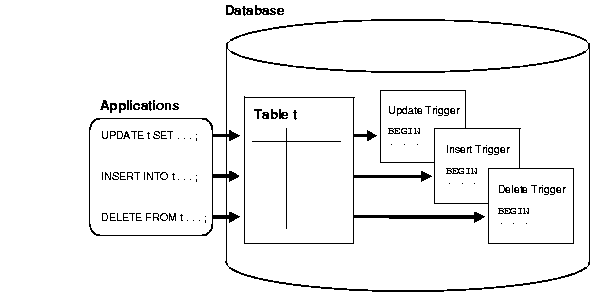
Oracle lets you define procedures called triggers that run implicitly when an INSERTUPDATE, or DELETE statement is issued against the associated table or, in some cases, against a view, or when database system actions occur. These procedures can be written in PL/SQL or Java and stored in the database, or they can be written as C callouts.
Triggers are similar to stored procedures. A trigger stored in the database can include SQL and PL/SQL or Java statements to run as a unit and can invoke stored procedures. However, procedures and triggers differ in the way that they are invoked. A procedure is explicitly run by a user, application, or trigger. Triggers are implicitly fired by Oracle when a triggering event occurs, no matter which user is connected or which application is being used.
Text description of cncpt076.gif follows

Data Access for Triggers

When a trigger is fired, the tables referenced in the trigger action might be currently undergoing changes by SQL statements in other users' transactions. In all cases, the SQL statements run within triggers follow the common rules used for standalone SQL statements. In particular, if an uncommitted transaction has modified values that a trigger being fired either needs to read (query) or write (update), then the SQL statements in the body of the trigger being fired use the following guidelines:
  • Queries see the current read-consistent materialized view of referenced tables and any data changed within the same transaction.
  • Updates wait for existing data locks to be released before proceeding.
The following examples illustrate these points.
Data Access for Triggers Example 1
Assume that the salary_check trigger (body) includes the following SELECT statement:
SELECT min_salary, max_salary INTO min_salary, max_salary
  FROM jobs 
  WHERE job_title = :new.job_title; 

For this example, assume that transaction T1 includes an update to the max_salary column of the jobs table. At this point, the salary_check trigger is fired by a statement in transaction T2. The SELECT statement within the fired trigger (originating from T2) does not see the update by the uncommitted transaction T1, and the query in the trigger returns the old max_salary value as of the read-consistent point for transaction T2.