Wednesday, 18 October 2017

MCA 2nd sem /MCSL-025/Solved Assignment/MCSL-25(LAB COURSE) /2017-2018 New

PART-1: MCS-021

 Q.1.(a)
A.1.(a) 
#include <stdio.h>
#include <conio.h>

#define MAX 10

struct term
{
    int coeff ;
    int exp ;
} ;

struct poly
{
    struct term t [10] ;
    int noofterms ;
} ;

void initpoly ( struct poly *) ;
void polyappend ( struct poly *, int, int ) ;
struct poly polyadd ( struct poly, struct poly ) ;
struct poly polymul ( struct poly, struct poly ) ;
void display ( struct poly ) ;

void main( )
{
    struct poly p1, p2, p3 ;

    clrscr( ) ;

    initpoly ( &p1 ) ;
    initpoly ( &p2 ) ;
    initpoly ( &p3 ) ;

    polyappend ( &p1, 1, 4 ) ;
    polyappend ( &p1, 2, 3 ) ;
    polyappend ( &p1, 2, 2 ) ;
    polyappend ( &p1, 2, 1 ) ;

    polyappend ( &p2, 2, 3 ) ;
    polyappend ( &p2, 3, 2 ) ;
    polyappend ( &p2, 4, 1 ) ;

    p3 = polymul ( p1, p2 ) ;

    printf ( "\nFirst polynomial:\n" ) ;
    display ( p1 ) ;

    printf ( "\n\nSecond polynomial:\n" ) ;
    display ( p2 ) ;

    printf ( "\n\nResultant polynomial:\n" ) ;
    display ( p3 ) ;

    getch( ) ;
}

/* initializes elements of struct poly */
void initpoly ( struct poly *p )
{
    int i ;
    p -> noofterms = 0 ;
    for ( i = 0 ; i < MAX ; i++ )
    {
        p -> t[i].coeff = 0 ;
        p -> t[i].exp = 0 ;
    }
}

/* adds the term of polynomial to the array t */
void polyappend ( struct poly *p, int c, int e )
{
    p -> t[p -> noofterms].coeff = c ;
    p -> t[p -> noofterms].exp =  e ;
    ( p -> noofterms ) ++ ;
}

/* displays the polynomial equation */
void display ( struct poly p )
{
    int flag = 0, i ;
    for ( i = 0 ; i < p.noofterms ; i++ )
    {
        if ( p.t[i].exp != 0 )
            printf ( "%d x^%d + ", p.t[i].coeff, p.t[i].exp ) ;
        else
        {
            printf ( "%d", p.t[i].coeff ) ;
            flag = 1 ;
        }
    }
    if ( !flag )
        printf ( "\b\b  " ) ;

}
/* adds two polynomials p1 and p2 */
struct poly polyadd ( struct poly p1, struct poly p2 )
{
    int i, j, c ;
    struct poly p3 ;
    initpoly ( &p3 ) ;

    if ( p1.noofterms > p2.noofterms )
        c = p1.noofterms ;
    else
        c = p2.noofterms ;

    for ( i = 0, j = 0 ; i <= c ; p3.noofterms++ )
    {
        if ( p1.t[i].coeff == 0 && p2.t[j].coeff == 0 )
            break ;
        if ( p1.t[i].exp >= p2.t[j].exp )
        {
            if ( p1.t[i].exp == p2.t[j].exp )
            {
                p3.t[p3.noofterms].coeff = p1.t[i].coeff + p2.t[j].coeff ;
                p3.t[p3.noofterms].exp = p1.t[i].exp ;
                i++ ;
                j++ ;
            }
            else
            {
                p3.t[p3.noofterms].coeff = p1.t[i].coeff ;
                p3.t[p3.noofterms].exp = p1.t[i].exp ;
                i++ ;
            }
        }
        else
        {
            p3.t[p3.noofterms].coeff = p2.t[j].coeff ;
            p3.t[p3.noofterms].exp = p2.t[j].exp ;
            j++ ;
        }
    }
    return p3 ;
}

/* multiplies two polynomials p1 and p2 */
struct poly polymul ( struct poly p1, struct poly p2 )
{
    int coeff, exp ;
    struct poly temp, p3 ;

    initpoly ( &temp ) ;
    initpoly ( &p3 ) ;

    if ( p1.noofterms != 0 && p2.noofterms != 0 )
    {
        int i ;
        for ( i = 0 ; i < p1.noofterms ; i++ )
        {
            int j ;

            struct poly p ;
            initpoly ( &p ) ;

            for ( j = 0 ; j < p2.noofterms ; j++ )
            {
                coeff = p1.t[i].coeff * p2.t[j].coeff ;
                exp = p1.t[i].exp + p2.t[j].exp ;
                polyappend ( &p, coeff, exp ) ;
            }

            if ( i != 0 )
            {
                p3 = polyadd ( temp, p ) ;
                temp = p3  ;
            }
            else
                temp = p ;
        }
    }
    return p3 ;
}

Q.2.
A.2.
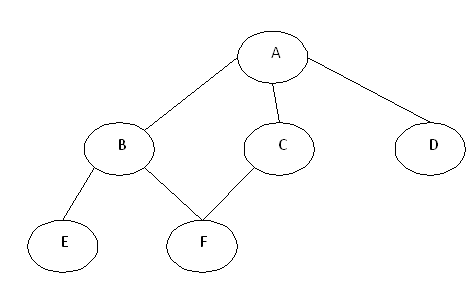
 
public void bfs()
{
//BFS uses Queue data structure
Queue q=new LinkedList();
q.add(this.rootNode);
printNode(this.rootNode);
rootNode.visited=true;
while(!q.isEmpty())
{
Node n=(Node)q.remove();
Node child=null;
while((child=getUnvisitedChildNode(n))!=null)
{
child.visited=true;
printNode(child);
q.add(child);
}
}
//Clear visited property of nodes
clearNodes();
}

PART-1: MCS-022 
Q.1.
A.1

A shell script is a computer program designed to be run by the Unix shell, a command – line Interpreter .The various dialects of shell scripts are considered to be scripting languages.
Typical operations performed by shell scripts include file manipulation, program execution, and printing text. A script which sets up the environment, runs the program, and does any necessary cleanup, logging, etc. is called a wrapper.

echo Enter a text
read text

w=`echo $text | wc -w`
w=`expr $w`
c=`echo $text | wc -c`
c=`expr $c - 1`
s=0
alpha=0
j=` `
n=1
while [ $n -le $c ]
do
ch=`echo $text | cut -c $n`
if test $ch =  $j
then
s=`expr $s + 1`
fi
case $ch in
(a|b|c|d|e|f|g|h|i|j|k|l|m|n|o|p|q|r|s|t|u|v|w|x|y|z) alpha=`expr $alpha + 1`;;
esac
n=`expr $n + 1`
done
special=`expr $c - $s - $alpha`
echo Words=$w
echo Characters=$c
echo Spaces=$s
echo Special symbols=$special
sentences = Words+ Characters+ Spaces + Special Symbols
echo $Sentences

Q.2.

A.2.


A.2. STEPS To Connect Printer:-
1.    Click on Start in the bottom left corner of your screen. A popup list will appear.
2.    Select Control Panel from the popup list. Type the word network in the search box.
3.    Click on Network and Sharing Center.
4.    Click on Change advanced shared settings, in the left pane.
5.    Click on the down arrow, which will expand the network profile.
6.    Select File and printer sharing and choose Turn on file and printer sharing.
7.    Click on Save changes.
You're now ready to share your printer.
1.    Click on Start in the bottom left corner of your screen. A popup list will appear.
2.    Click on Devices and Printers, from the popup list.
3.    Right click the printer you want to share. A dropdown list will appear.
4.    Select Printer properties from the dropdown list.
5.    Click on the Sharing tab
6.    Select the Share this printer check box.
In order for other people to connect to the printer, they just have to add the network printer that you just opened for sharing to their computers. Here's how to do this.

1.    Click on Start in the bottom left corner of your screen. A popup list will appear.
2.    Click on Devices and Printers from the popup list.
3.    Select Add a printer.
4.    Click on Add a network, wireless or Bluetooth printer.
5.    Click the shared printer.

6.    Click Next. Continue according to the instructions on the screen.


PART-1: MCS-023 
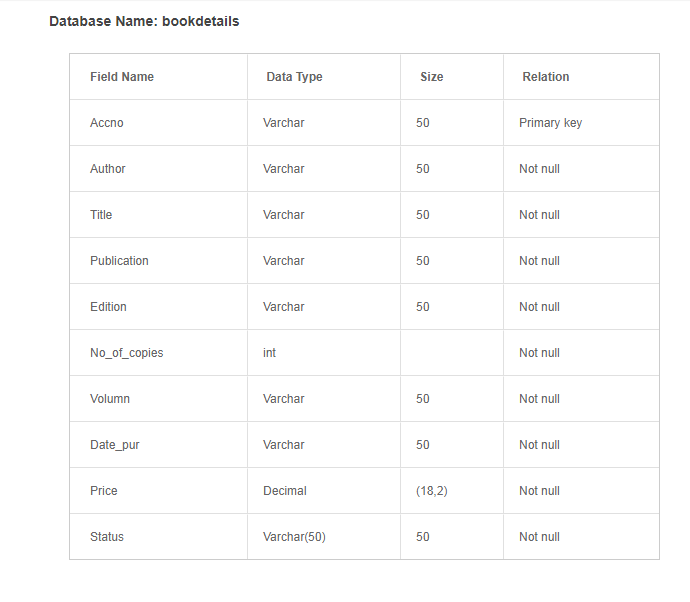
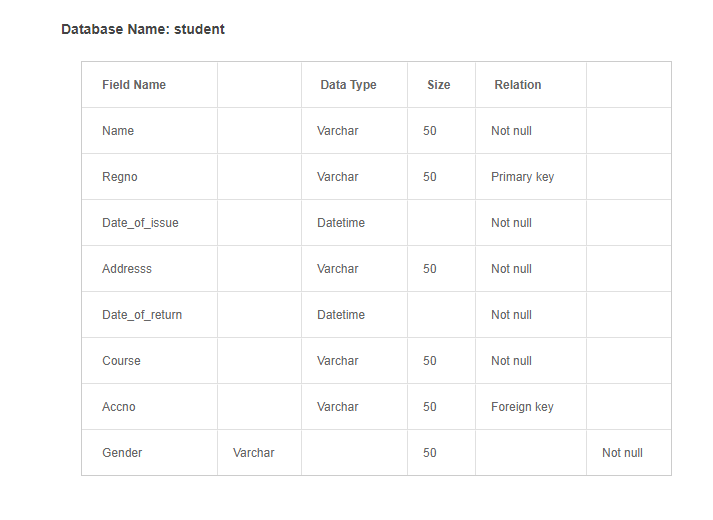
Create Table :-

Step 2:- Inserting Values In Table:-


Step3:- Generate a Select Query Statment:-

Select * from t1 where Prorammes = 'MCA'
And Execute it.

Step 4:- 
NameofStudyCenter   CodeOfStudyCenter  Prorammes  NumberOfStudent
 BHU                                       27109              MCA                   45
MCMT                                     48012               MCA                   10
BHUKamachha                      48003                MCA                   15
AryaMahila                              48022                MCA                  20


PART-1: MCS-024
A.1.
Array equal to the number of rows of the matrix and the length of the sub arrays equal to the number of columns of the matrix. For example, a matrix of order 3*7 will be represented as a 2D array matrix[3][7]. A two level nested for loop will be used to read the input matrices from the keyboard. The outer loop counter, i ranges from 0 to the number of rows of the matrix while the inner loop counter, j ranges from 0 to the number of columns of the matrix. Within the inner loop, the input integers will be read using nextInt() method of the scanner class and stored at position [i][j] of the array. 

import java.util.Scanner;

public class MatrixAddition {

   public static void main(String[] args) {
       Scanner s = new Scanner(System.in);
       System.out.print("Enter number of rows: ");
       int rows = s.nextInt();
       System.out.print("Enter number of columns: ");
       int columns = s.nextInt();
       int[][] a = new int[rows][columns];
       int[][] b = new int[rows][columns];
       System.out.println("Enter the first matrix");
       for (int i = 0; i < rows; i++) {
           for (int j = 0; j < columns; j++) {
               a[i][j] = s.nextInt();
           }
       }
       System.out.println("Enter the second matrix");
       for (int i = 0; i < rows; i++) {
           for (int j = 0; j < columns; j++) {
               b[i][j] = s.nextInt();
           }
       }
       int[][] c = new int[rows][columns];
       for (int i = 0; i < rows; i++) {
           for (int j = 0; j < columns; j++) {
               c[i][j] = a[i][j] + b[i][j];
           }
       }
       System.out.println("The sum of the two matrices is");
       for (int i = 0; i < rows; i++) {
           for (int j = 0; j < columns; j++) {
               System.out.print(c[i][j] + " ");
           }
           System.out.println();
       }
   }
}
Here is a sample execution. 
Enter number of rows: 2
Enter number of columns: 3
Enter the first matrix
3 4 7
1 8 4
Enter the second matrix
3 2 1
1 0 4
The sum of the two matrices is
6 6 8
2 8 8


A.2.
import java.sql.*;       // Use classes in java.sql package

                                   // JDK 7 and above


public class JdbcSelectTest                     { // Save as "JdbcSelectTest.java"

public static void main(String[] args) {
try (
// Step 1: Allocate a database "Connection" object 

Connection conn = DriverManager.getConnection(
"jdbc:mysql://localhost:8888/ebookshop", "myuser", "xxxx"); // MySQL

// Connection conn = DriverManager.getConnection(
// "jdbc:odbc:ebookshopODBC"); // Access

// Step 2: Allocate a "Statement" object in the Connection
Statement stmt = conn.createStatement();

 {


// Step 3: Execute a SQL SELECT query, the query result
// is returned in a "ResultSet" object.


String strSelect = "select title, price, qty from books";
System.out.println("The SQL query is: " + strSelect); // Echo For debugging
System.out.println();


ResultSet rset = stmt.executeQuery(strSelect);
// Step 4: Process the ResultSet by scrolling the cursor forward via next().


// For each row, retrieve the contents of the cells with getXxx(columnName).
System.out.println("The records selected are:");


int rowCount = 0;
while(rset.next()) { // Move the cursor to the next row}
String title = rset.getString("title");

double price = rset.getDouble("price");

int qty = rset.getInt("qty");

System.out.println(title + ", " + price + ", " + qty);++rowCount;
}
System.out.println("Total number of records = " + rowCount);
} catch(SQLException ex) {

ex.printStackTrace();}
}
}

Sunday, 15 October 2017

MCA 4th sem /MCSL-045/Solved Assignment/UNIX and DBMS Lab /2017-2018 New

Part -1 : MCS - 041

Q.1.
A.1.
a) The Unix passwd command
The standard Unix command to change your password is:

  passwd
You must know your current password.
To change your password while logged onto a UNIX machine, type:passwd
To see the possible command line options, type: man passwd
If no options are given, actions are as follows:
The name that the user logged in as is determined.
If an entry for the user exists in the NIS (Network Information Service) passwd database, the password field in that entry is changed.

b) grep [OPTIONS] PATTERN [FILE...]
The pattern matching done by grep command is case sensitive. For example, if the argument to grep command is "LINUX" (instead of "Linux") then grep will not match the lines containing string "Linux". 

Here is an example :
# grep "LINUX" input.txt 
#

c)   head -lines filename
In this example, lines is an optional value specifying the number of lines to be read. If you don't give a number, the default value of 10 is used. Also, filename represents the name of an optional file for the head command to read. Otherwise, it will take its input from stdin (standard input: the terminal, or whatever the shell feeds the process with, usually pipe output).

For example, given a file containing the English alphabet with each letter on a separate line, a user enters the command:

  head -3 alphabetfile
This command would return:

  a
  b
  c
You can also use the head command with pipes. For example, to see the sizes of the first few files in a large directory, you could enter at the Unix prompt:

  ls -l | head

d) To view only the processes owned by a specific user, use the following command:

top -U [username]
Replace the [username] with the required username

If you want to use ps then

ps -u [username]
OR

 ps -ef | grep <username>
OR

ps -efl | grep <username>

e) kill PID
Replace PID with the process ID of the job. If that fails, enter the following:

 kill -KILL PID
To determine a job's PID, enter:
 jobs -l

f)$ wc -l file.txt
1020 file.txt

g)sort sorts the contents of a text file, line by line.
sort [options] filename

The options are:

-b : Ignores leading spaces in each line
-d : Uses dictionary sort order. Conisders only spaces and alphanumeric characters in sorting
-f : Uses case insensitive sorting.
-M : Sorts based on months. Considers only first 3 letters as month. Eg: JAN, FEB
-n : Uses numeric sorting
-R : Sorts the input file randomly.
-r : Reverse order sorting
-k : Sorts file based on the data in the specified field positions.
-u : Suppresses duplicate lines
-t : input field separator

h) $ echo qWeRtY | sed -E 's/([[:lower:]])|([[:upper:]])/\U\1\L\2/g'
QwErTy

i) 


j)
Display a conveniently-formatted calendar from the command line.
cal [options] [[[day] month] year]
Options

-1
Display a single month, which is the default setting.
-3
Display three months: last month, this month, and next month.
-s
Display the calendar using Sunday as the first day of the week.
-m
Display Monday as the first day of the week.
-j
Display dates of the Julian calendar.
-y
Display a calendar for the entire current year.
cal examples

cal
Displays the calendar for this month.
cal 12 2000

Shell Programming:-
1)  
read -p "Enter first Number:" n1
read -p "Enter second Number:" n2
read -p "Enter third Number:" n3
read -p "Enter fourth Number:" n4
read -p "Enter fourth Number:" n5
if[ [ n1 -gt n2 ] && [ n1 -gt n2 ] && [ n1 -gt n3 ] && [ n1 -gt n4 ] && [ n1 -gt n5 ]] ; then
      echo "$n1 is a Greatest Number"
elif[ [ n2 -gt n3 ] && [ n2 -gt n3 ] && [ n2 -gt n4 ] && [ n2 -gt n5 ]] ; then
     echo "$n2 is a Greatest Number"
elif[ [ n3 -gt n4 ] && [ n3 -gt n5 ] ] ; then  
     echo "$n3 is a Greatest Number"
elif[ n4 -gt n5 ] ; then  
     echo "$n4 is a Greatest Number"
else
     echo "$n5 is a Greatest Number"
fi

2)
echo Enter a 7 digit number
read num
n=1
while [ $n -le 7 ]
do
a=`echo $num | cut -c $n`
echo $a 
n=`expr $n + 2`
done

3)
clear
echo "Entre a string to find the number of Vowels "
read st
len=`expr $st | wc -c`
len=`expr $len - 1`
count=0
while [ $len -gt 0 ]
do
ch=`expr $st | cut -c $len`
case $ch in

[aeiou,AEIOU]) count=`expr $count + 1` ;;
esac
len=`expr $len - 1`
done
echo "Number of vowels in the give string is $count"

OutPut

Entre a string to find the number of Vowels
AbcefuSI
Number of vowels in the give string is 4

4) #!/bin/bash 
echo Enter first string: 
read s1 
echo Enter second string: 
read s2 
s3=$s1$s2 
len=`echo $s3 | wc -c` 
len=`expr $len - 1` 
echo Concatenated string is $s3 of length $len

5)
echo "Enter a Number:"
read a

rev=0
sd=0
or=$a

while [ $a -gt 0 ]
do
        sd=`expr $a % 10`
        temp=`expr $rev \* 10`
        rev=`expr $temp + $sd`
        a=`expr $a / 10`
done

echo "Reverse of $or is $rev"


Part -2 : MCS - 043

A.1.(a) 
MCA_Evaluation_System


create table Rent
(
aptid int primary key,
rentsetdate date primary key notnull,
rentpermonth int
);


create table Renter

(
renterID int  foreign key notnull ,
name varchar(20) notnull,
contact varchar(50) notnull
);


create table Rental
(
aptID int foreign key notnull ,
renterID int foreign key notnull,
startdate date notnull,
enddate date notnull,
checkout varchar(2)
);


create Apartment(aptID, city, street, housenr, aptnr, size, purchdate, price).
(
aptID int foreign key notnull ,
city varchar(50) notnull,
street varchar(20) notnull,
housenr int notnull,
aptnr int notnull,
size int notnull,
purchdate date notnull,
price int notnull
);


A.1.(b)

(i)To find the total rent earned during certain time interval (input to be given by the user) for a particular aptID.

Ans:- Select  aptID  from Rent where aptID = '2'

(ii) To display all the aptIDs if the street ID and City are given.

Ans:- Select * from Apartment where street = 'Khajuri' and city = 'Varanasi';

(iii) To display the list of all the renters who have more than one apt.

Ans:- Select * from renter where name>= 2

(iv) To display the list of all aptIDs whose rent is equal to or more than Rs.15,000/- per month in a particular street with apt size more than 850sq feet

Ans:- Select * from Rent where rentpermonth>= 15000  and aptID.size > 850 ;

(v) To display all the details of the apartment which were bought before year 2000 in a particular city and street.

Ans:- Select * from Apartment where  year = '2000' and city = 'Varanasi' and street ='Khajuri';


Q.1.(c)
A.1.(c)
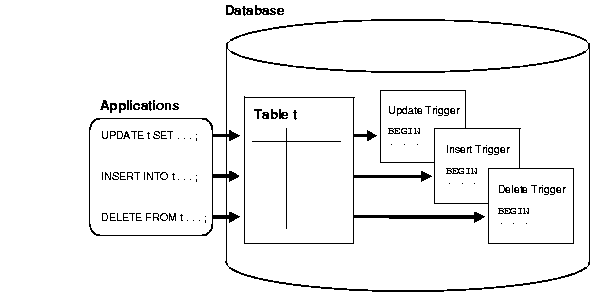
Oracle lets you define procedures called triggers that run implicitly when an INSERTUPDATE, or DELETE statement is issued against the associated table or, in some cases, against a view, or when database system actions occur. These procedures can be written in PL/SQL or Java and stored in the database, or they can be written as C callouts.
Triggers are similar to stored procedures. A trigger stored in the database can include SQL and PL/SQL or Java statements to run as a unit and can invoke stored procedures. However, procedures and triggers differ in the way that they are invoked. A procedure is explicitly run by a user, application, or trigger. Triggers are implicitly fired by Oracle when a triggering event occurs, no matter which user is connected or which application is being used.
Text description of cncpt076.gif follows

Data Access for Triggers

When a trigger is fired, the tables referenced in the trigger action might be currently undergoing changes by SQL statements in other users' transactions. In all cases, the SQL statements run within triggers follow the common rules used for standalone SQL statements. In particular, if an uncommitted transaction has modified values that a trigger being fired either needs to read (query) or write (update), then the SQL statements in the body of the trigger being fired use the following guidelines:
  • Queries see the current read-consistent materialized view of referenced tables and any data changed within the same transaction.
  • Updates wait for existing data locks to be released before proceeding.
The following examples illustrate these points.
Data Access for Triggers Example 1
Assume that the salary_check trigger (body) includes the following SELECT statement:

SELECT min_salary, max_salary INTO min_salary, max_salary
  FROM jobs 
  WHERE job_title = :new.job_title; 

For this example, assume that transaction T1 includes an update to the max_salary column of the jobs table. At this point, the salary_check trigger is fired by a statement in transaction T2. The SELECT statement within the fired trigger (originating from T2) does not see the update by the uncommitted transaction T1, and the query in the trigger returns the old max_salary value as of the read-consistent point for transaction T2.

Saturday, 14 October 2017

MCA 4th sem /MCSP-044/Solved Assignment/Mini Project/2017-2018 New

Q.1.(a) Which Systems Development Life Cycle (SDLC) will you propose for the specification given above? 

A.1.(a)


SDLC is a process followed for a software project, within a software organization. It consists of a detailed plan describing how to develop, maintain, replace and alter or enhance specific software. The life cycle defines a methodology for improving the quality of software and the overall development process.

The following figure is a graphical representation of the various stages of a typical SDLC.

Stage 1: Planning and Requirement Analysis

Requirement analysis is the most important and fundamental stage in SDLC. It is performed by the senior members of the team with inputs from the customer, the medicine department, market surveys and domain experts in the industry. This information is then used to plan the basic project approach and to conduct product feasibility study in the economical, operational, and technical areas.

Stage 2: Defining Requirements

Once the requirement analysis is done the next step is to clearly define and document the product requirements and get them approved from the customer or the market analysts. This is done through .SRS. . Software Requirement Specification document which consists of all the product requirements to be designed and developed during the project life cycle.

Stage 3: Designing the product architecture

SRS is the reference for product architects to come out with the best architecture for the product to be developed. Based on the requirements specified in SRS, usually more than one design approach for the product architecture is proposed and documented in a DDS - Design Document Specification.

Stage 4: Building or Developing the Product

In this stage of SDLC the actual development starts and the product is built. The programming code is generated as per DDS during this stage. If the design is performed in a detailed and organized manner, code generation can be accomplished without much hassle.

Stage 5: Testing the Product

This stage is usually a subset of all the stages as in the modern SDLC models, the testing activities are mostly involved in all the stages of SDLC. However this stage refers to the testing only stage of the product where products defects are reported, tracked, fixed and retested, until the product reaches the quality standards defined in the SRS.

Stage 6: Deployment in the Market and Maintenance

Once the product is tested and ready to be deployed it is released formally in the appropriate market. Sometime product deployment happens in stages as per the organizations. business strategy. The product may first be released in a limited segment and tested in the real business environment (UAT- User acceptance testing).

Q.1.(b) Justify you selection by evaluating suitability of at least two SDLCs.

A.1.(b)


We select Spiral and V model for University Library Management System :-

Causing for selecting spiral model:-

The spiral model combines the idea of iterative development with the systematic, controlled aspects of the waterfall model.
Spiral model is a combination of iterative development process model and sequential linear development model i.e. waterfall model with very high emphasis on risk analysis.
It allows for incremental releases of the product, or incremental refinement through each iteration around the spiral.


Causing for selecting V model:-


Under V-Model, the corresponding testing phase of the development phase is planned in parallel. So there are Verification phases on one side of the .V. and Validation phases on the other side. Coding phase joins the two sides of the V-Model.
Q.2.(a) Justify you selection by evaluating suitability of at least two SDLCs.

A.2.(a)
Costs
The newly implemented Medical store system created additional costs that were not incurred with the paper-chart system. There are 2 cost categories: the system costs and the induced costs. The system costs include the direct costs to build the system infrastructure, to develop the Medical Stores applications, and to purchase office supplies. The induced costs were required to smooth the Medical Store adoption. The first cost was to scan the existing paper-charts into the Medical Stores system. The second cost was to provide assistance to doctors through medical transcriptionists (MTs). MTs are typists who enter medical records into the Medical Stores system instead of the physicians at the point of care.


Q.2.(b)What may be the financial benefits of installing such a system?
A.2.(b)

1) More efficient operations

Because Medical Store management software provides an overview of day-to-day details such as patient appointments and staff reports, it serves as a helpful point of reference for tasks that have yet to be completed. Such systems also safeguard against forgetting important details, and can keep a checklist of yet-to-be-completed tasks. Because small Medical Stores often lack the resources of hospitals or larger offices, software can significantly help staff members manage their daily workflows.

2) Easier access to records

Medical Store management software stores important data in a safe, easily accessible location. Rather than using an outdated method such as a filing cabinet, such systems allow Medical Stores to keep digital copies of important information. If a doctor has a question about a referring physician, or a past medication, he or she can access the information almost instantly. Staff members can also easily find insurance and billing information. When team members can find relevant documents, the Medical Store can operate in an accurate, timely manner.

Many software systems are linked to electronic medical records. These records, of course, are used primarily for proper diagnosis and treatment. Having a digitalized copy of patient records allows providers to quickly access pertinent information in order to guarantee an accurate diagnosis. Many solo Medical Stores use free, cloud-based software, such as Kareo or Medical Store Fusion, which allow workers to easily schedule appointments, complete insurance, store patient information, and more. While Medical Stores can choose between traditional client-server and cloud-based alternatives, many prefer the flexibility that the latter option provides. If users need to access data remotely or want to avoid the cost associated with in-house servers, cloud-based systems are now a viable (and possibly superior) alternative.

3) Simplified billing

Medical Store management software allows Medical Stores to easily bill patients and process claims. Popular solutions, such as Epic’s Resolute Professional Billing system, allow users to easily complete financial transactions. They also provide an overview of past transactions. Many online Medical Store management systems can be integrated with patient portals or comprehensive EHRs, and allow patients to access their bills through a secure online site. This helps decrease payment time and keeps patients notified of any problems.
Medical Store management software helps medical offices run more smoothly, stores data in a safe location, and allows Medical Stores to easily bill patients. Proper implementation of the system will enable Medical Stores to transition from old, outdated methods to new methods. The system will improve efficiency and accuracy and provide easier access to relevant data. As such, it is a worthwhile investment for small Medical Stores.

Q.2.(c)Perform a cost-benefit analysis for the proposed software and report its findings.
A.2.(c) 
Cost-Benefit Analysis

In this study a CBA based on cash flows of SMC was carried out. The detailed items of costs and benefits were determined based on differential costing, which is mainly used for decision making in managerial accounting, after comparison of workflows between the paper-chart system and the Medical Store system. This was a conservative CBA in that this study excluded any potential or qualitative benefits . The financial costs and benefits were obtained primarily through the SMC accounting records. The costs of Medical Store implementation were the actual measured value. However, the benefits were calculated by using the difference between actual measured values and expected values without the Medical Store system. Therefore, when data were not available, capital amounts were determined by the opinions of experts, such as medical record administrators, care floor nurses, and IT engineers. The measured amounts were converted to present values (PV) using SMC's expected interest rate. Then, the net present value (NPV), the benefit-cost ratio (BCR), and the discounted payback period (DPP) were calculated.Q.2.(d)List the major tasks and milestones of the Project and make a project schedule. You must make both GANTT and PERT charts. Explain the two charts drawn by you.

Q.2.(d) 
A.2.(d)

Gantt Chart :-The Gantt chart was first developed and introduced by Charles Gantt in 1917. It deals with the sequence of tasks needed to complete the project. In this chart, each horizontal bar represents a task. The length of the bar shows the time required to complete the task. On an X-Y chart, the X-axis stands for the time in which the project will get completed. The Gantt chart is a very effective tool in assessing a project’s status. It basically emphasizes and shows how much time is required for completing a task.


Pert Chart:- 

Program Evaluation and Review Technique charts were developed and introduced in 1950 by the U.S. Navy. They were developed to manage large projects which had complex tasks and a very high intertask dependency. The charts have an initiation node, and the initiation node later branches into many networks of tasks.

Q.3(a)  Study the system and create a software requirement specification. You must identify either the processes or objects while analyzing. During the analysis give consideration to possible input and output of the processes.
A.3.(a)
Specific Requirements

                    The specific requirements are :-


Introduction –

This subsection contains the requirements for the e-store. These requirements are organized by the features discussed in the vision document. Features from vision documents are then refined into use case diagrams and to sequence diagram to best capture the functional requirements of the system. All these functional requirements can be traced using tractability matrix.


Sell Configured to Ordered Products.
The system shall display all the products that can be configured.
The system shall allow user to select the product to configure.
The system shall display all the available components of the product to configure
The system shall enable user to add one or more component to the configuration.
The system shall notify the user about any conflict in the current configuration.
The system shall allow user to update the configuration to resolve conflict in the current configuration.
The system shall allow user to confirm the completion of current configuration


Provide comprehensive product details. 

The system shall display detailed information of the selected products.
The system shall provide browsing options to see product details.

Detailed product Categorizations

The system shall display detailed product categorization to the user.


Provide Search facility.


The system shall enable user to enter the search text on the screen.

The system shall enable user to select multiple options on the screen to search.

The system shall display all the matching products based on the search

The system shall display only 10 matching result on the current screen.

The system shall enable user to navigate between the search results.

The system shall notify the user when no matching product is found on the search.


Maintain customer profile.
The system shall allow user to create profile and set his credential.

The system shall authenticate user credentials to view the profile.

The system shall allow user to update the profile information.


Q.3.(b)After identifying the requirements, create Analysis Models. You may either use the classical approach and draw Entity relationship diagram and data flow diagrams (DFD’s) up to level 2-3;
or
you may take object oriented analysis approach and create class diagram, use case diagram, use cases etc.
A.3.(b)
ERD


DFD from 0 Level to 2 level


Class Digram


USE CASE DIGRAM


Q.4. (a) Design the system architecture and the database as per the needs of the system. You must perform normalization on tables up to 3 rd normal form. The table design must include Primary and Foreign keys and constrains. 

A.4. (a)  


Q.4(b) Create the system flow chart or detailed process design and state transition diagrams. Also design the user input screens and output report formats. 

A.4. (b) 

State Transition Digram


Q.5.Design various unit test cases for different testing techniques/strategies. 

A.5.

Test case Design Technique

Following are the typical design techniques in software engineering:

1. Deriving test cases directly from a requirement specification or black box test design technique. The Techniques include:
· Boundary Value Analysis (BVA)
· Equivalence Partitioning (EP)
· Decision Table Testing
· State Transition Diagrams
· Use Case Testing

2. Deriving test cases directly from the structure of a component or system:
· Statement Coverage
· Branch Coverage
· Path Coverage
· LCSAJ Testing

3. Deriving test cases based on tester's experience on similar systems or testers intuition:
· Error Guessing
· Exploratory Testing